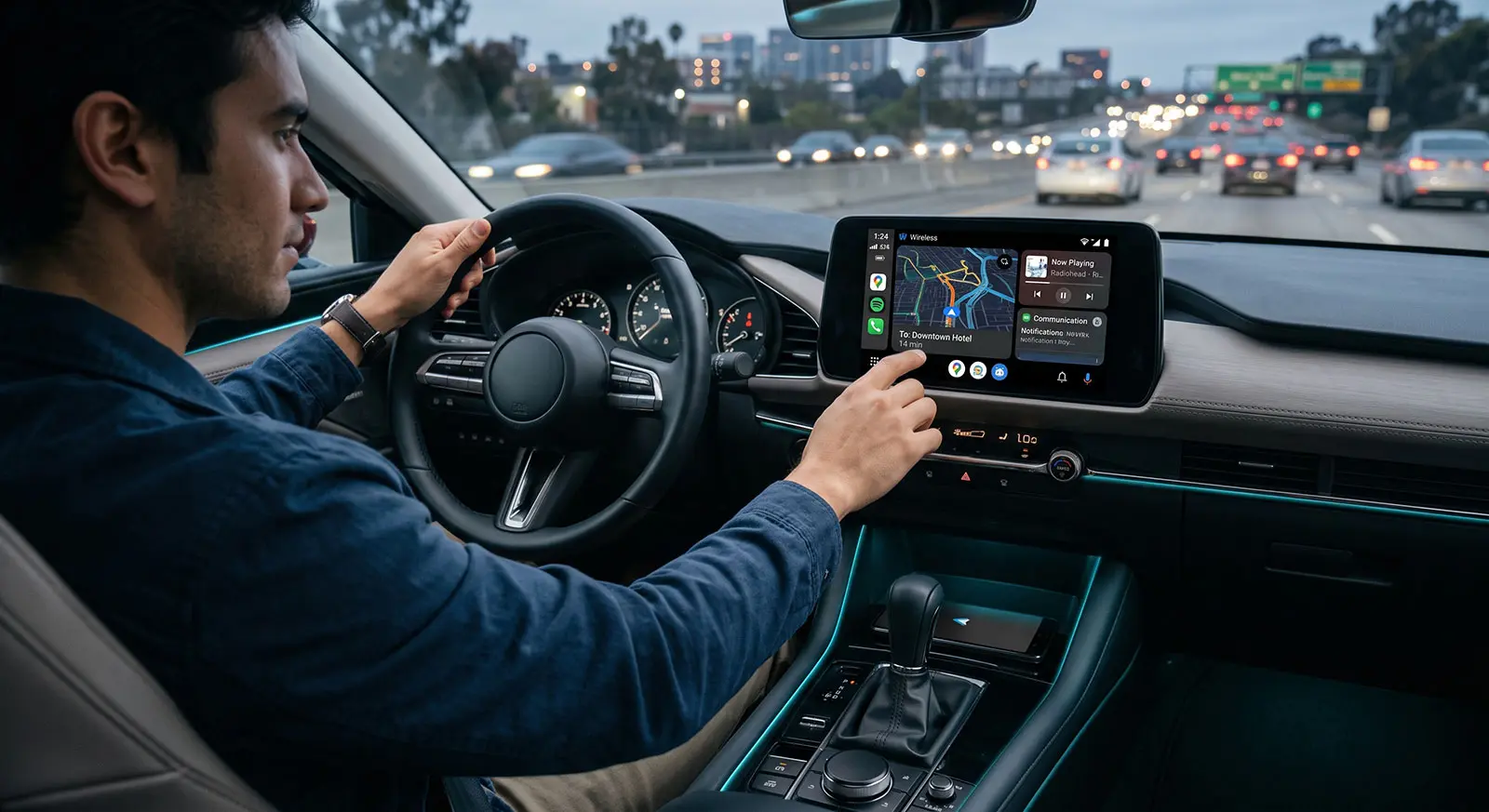
Tossing your phone onto the passenger seat, turning the ignition, and watching your navigation map glide smoothly onto the car’s dashboard screen without touching a single wire feels like pure automotive magic. The wireless evolution of in-car infotainment promised to eliminate the messy spaghetti of USB cables cluttering cup holders, worn-out charging ports, and fragile phone mounts forever. For daily commuters and road-trip enthusiasts alike, cutting the physical cord represents the pinnacle of convenience: your music resumes instantly, your morning route calculates automatically, and your hands stay firmly on the wheel.
Yet, for millions of drivers, this seamless convenience quickly morphs into daily frustration. You find yourself sitting at a red light while the screen freezes entirely, audio stutters like a scratched CD from 1999, or the entire interface abruptly disconnects precisely when you need an upcoming highway exit. Even worse, many drivers assume wireless connectivity functions purely through standard Bluetooth, leaving them bewildered when pairing standard audio works fine while full screen projection persistently crashes or fails to launch at startup.
The truth is that Wireless Android Auto is a complex, high-bandwidth communication system. Under the hood, your smartphone and vehicle perform a delicate dance involving rapid Bluetooth handshakes, dedicated 5GHz Wi-Fi Direct streaming pipelines, and intense real-time video encoding. When any single link in this chain falters whether due to aggressive background battery management on your phone, invisible radio frequency interference from toll gantries, or hidden Wi-Fi channel conflicts the entire system drops out.
This comprehensive guide breaks down the mechanics behind wireless projection, eliminates common misconceptions, and provides actionable, step-by-step solutions to diagnose and permanently resolve wireless dropouts, black screens, and latency. Whether you are connecting to a factory-installed OEM infotainment unit or utilizing an aftermarket wireless USB dongle, here is how to lock in a rock-solid, zero-glitch setup.
Understanding the Wireless Handshake: Bluetooth vs. Wi-Fi Direct
One of the most widespread misconceptions among car owners is that Wireless Android Auto operates entirely over Bluetooth. When users experience connection drops, their first instinct is often to toggle Bluetooth off and on, only to find the problem persists. To effectively troubleshoot wireless glitches, you must first understand the two-phase communication architecture that powers in-car projection.
-
The Initial Handshake (Bluetooth Low Energy / Classic): When you step inside your vehicle and start the ignition, your smartphone and the head unit establish contact via standard Bluetooth. This connection exchanges basic security credentials, passes authentication tokens, and negotiates network capabilities. However, Bluetooth’s maximum theoretical bandwidth tops out at roughly 2 to 3 Mbps. While this is plenty of bandwidth for low-bitrate compressed voice calls and standard SBC/AAC audio streams, it falls drastically short of what is required to broadcast high-resolution 1080p video, real-time map telemetry, multi-touch capacitive inputs, and uncompressed media simultaneously.
-
The High-Throughput Pipeline (5GHz Wi-Fi Direct): Once the Bluetooth handshake succeeds, your phone and the car’s infotainment system automatically create a private, peer-to-peer Wi-Fi network (typically using Wi-Fi Direct or a dedicated hidden car hotspot). The entire user interface from GPS map rendering to fluid 60fps animations is encoded into a video stream (H.264 or H.265) on your phone and broadcast over this local 5GHz Wi-Fi link. 5GHz is critical here because it provides the low latency and massive bandwidth required to prevent input lag when tapping the touchscreen.
-
Factory Head Units vs. Wireless Dongles: Factory wireless systems have dedicated Wi-Fi antennas integrated directly into the dashboard console, communicating natively with the vehicle's bus system. In contrast, aftermarket wireless adapters (such as the Motorola MA1, AAWireless, or Carlinkit) plug into your car’s wired USB port and act as an active bridge. The dongle tricks the head unit into thinking a wired phone is connected, while simultaneously hosting the Bluetooth and Wi-Fi Direct server that communicates with your smartphone.
Step-by-Step: Connecting Wireless Android Auto the Right Way
Establishing a clean initial pairing sequence is the single most effective way to prevent persistent handshake loops and random dropouts. Bypassing steps or attempting to connect manually via the Wi-Fi settings menu often corrupts the security tokens exchanged between the operating system and the head unit.
-
Pre-Flight Compatibility Checklist:
-
Operating System Requirements: Ensure your smartphone runs Android 11.0 or later (Android 10.0 with a Google Pixel or Samsung Galaxy device). Android 12 through current Android releases feature wireless projection baked natively into the core OS.
-
Network Hardware Support: Your phone must support 5GHz Wi-Fi. In regions with strict 5GHz indoor/outdoor regulations (like the EU or Japan), ensure your device regulatory profile complies with local Wi-Fi transmission standards.
-
In-App Settings: Open Settings > Connected Devices > Connection Preferences > Android Auto (or search for Android Auto in system settings). Scroll down and confirm that Wireless Android Auto projection is toggled ON.
-
-
First-Time Pairing Sequence (Factory Wireless Systems):
-
Turn on your vehicle’s ignition and keep the transmission parked.
-
Ensure both Bluetooth and Wi-Fi are switched ON on your phone (do not connect to any Wi-Fi network manually yet).
-
On the car’s infotainment screen, navigate to the Phone / Device Manager menu and select Add New Device.
-
On your phone, go to Settings > Bluetooth, search for your car's pairing name, and tap it.
-
Confirm that the 6-digit PIN displayed on your car screen matches the PIN on your phone screen, then tap Pair.
-
Grant permissions for contacts and call history if prompted.
-
A system prompt will appear on your phone asking: "Use Android Auto with [Car Model]?" Tap Continue or Use Android Auto.
-
The phone will automatically negotiate the hidden 5GHz Wi-Fi connection in the background. The Android Auto interface will launch on your dashboard display within 10–15 seconds.
-
-
Configuring Aftermarket Wireless Adapters (AAWireless, Motorola MA1, Carlinkit):
-
Plug the adapter directly into the designated data-enabled USB-A or USB-C port (often marked with a smartphone or USB icon, not a charge-only lightning bolt).
-
Do not attempt to pair with the adapter's Wi-Fi network manually. Instead, search for the adapter's name under your phone's Bluetooth menu and pair.
-
Allow the companion app (if applicable, such as the AAWireless app) to assign the appropriate Wi-Fi channel (Channel 36 or 149 are standard low-interference frequencies) and hand over the stream.
-
Diagnosing Common Cable-Free Glitches and Dropouts
When wireless projection fails mid-drive, the symptoms usually fall into one of three distinct categories: frozen visual output, localized RF drops, or audio-to-video desynchronization. Identifying the exact failure signature allows you to isolate the root cause immediately rather than guessing blindly.
-
The Infamous "Black Screen" Freeze: A black screen where the head unit indicates Android Auto is active, but renders no visual elements, is typically caused by a video rendering pipeline stall. This occurs when the Android OS background display manager fails to allocate a virtual surface for projection, or when the video codec (H.264/H.265) crashes under sudden memory pressure.
-
Immediate Workaround: Swipe down on your phone to open the notification shade, tap the persistent Android Auto notification to force a foreground redraw, or toggle Airplane Mode on for 3 seconds to force a clean re-initialization of the media stream.
-
-
Location-Specific Disconnections (Toll Gantries & Dense RF Zones): If your wireless connection consistently cuts out at the exact same physical location (e.g., passing under electronic toll collection gantries, near major airport radar zones, or driving past high-voltage power substations), you are experiencing severe 5GHz radio frequency (RF) interference. Electronic toll collection gantries and municipal radar systems operate on Dynamic Frequency Selection (DFS) channels within the 5GHz spectrum. When your car's head unit or phone detects priority radar signals, it forcibly drops the active Wi-Fi channel to avoid illegal interference.
-
Audio Stuttering & Touchscreen Input Latency: A 1-to-2-second lag between pressing the physical steering wheel control and the song skipping or choppy, robotic Spotify playback indicates Wi-Fi Direct packet loss and high buffer jitter. While Bluetooth handles voice call metadata, all stereo media streaming over wireless Android Auto travels across the local Wi-Fi link. Packet loss can occur if your phone is trapped deep inside an insulated purse, a metallic center console, or placed directly on an unshielded wireless charging coil.
Advanced Troubleshooting: Solving Persistent Connection Failures
When standard pairing steps fail to deliver a consistent link, the underlying culprit is almost always rooted in aggressive software power management, background network restrictions, or corrupted cache tables within core system services. Resolving these requires diving into your device's core system preferences to ensure unrestricted continuous transmission.
-
Disable Aggressive OEM Battery Optimization: Modern smartphone manufacturers (particularly Samsung One UI, Xiaomi HyperOS, and OnePlus OxygenOS) employ aggressive RAM-management algorithms that kill background tasks to preserve battery life. Because wireless projection runs silently in the background while your phone screen is off, the OS may identify the projection engine as a resource drain and terminate the Wi-Fi streaming thread.
-
Navigate to Settings > Apps > Android Auto > Battery (or App Battery Usage).
-
Switch the setting from Optimized or Restricted directly to Unrestricted (or Don't Optimize).
-
Repeat this exact process for Google Play Services and your primary navigation app (e.g., Google Maps, Waze) to prevent GPS sleep states.
-
-
Disable Conflicting VPNs, Ad-Blockers, and Private DNS: Wireless Android Auto relies on establishing a localized, direct IP subnet between your vehicle's Wi-Fi interface and your smartphone. System-wide VPNs (such as NordVPN, ExpressVPN, or corporate WireGuard profiles) and local loopback ad-blockers (like AdGuard or DNS66) intercept all outgoing network traffic and attempt to route local projection packets through external remote servers.
-
Temporarily toggle off your VPN before connecting.
-
If you use a custom Private DNS provider in Settings > Network & Internet > Private DNS, set it to Automatic or Off to test whether host resolution is blocking local socket handoffs.
-
-
Perform a Deep Cache and Service Purge: Corrupted temporary data within system caches can trigger persistent handshake failure loops.
-
Go to Settings > Apps > Android Auto > Storage & Cache and tap Clear Cache, followed by Clear Data / Storage.
-
Go to Settings > Apps > Google Play Services > Storage & Cache and tap Clear Cache.
-
Restart your smartphone to re-index system permissions before attempting a new handshake.
-
-
Adjust Wi-Fi Bands and Channels on Wireless Adapters: If you are utilizing an aftermarket wireless dongle (such as AAWireless), open the companion app and explore the advanced network configuration settings. Change the operating band from automatic channel selection to a fixed, non-DFS channel such as Channel 36 (5180 MHz) or Channel 149 (5745 MHz), or switch the dongle force mode from 5GHz to 2.4GHz temporarily to test whether local environmental interference is severing the feed.
Hardware & Environmental Interference Factors
While software settings account for a significant portion of connection failures, the physical environment inside your vehicle often introduces silent hardware bottlenecks that directly cripple 5GHz Wi-Fi projection. Modern car cabins are dense electromagnetic spaces filled with multiple competing wireless signals, charging coils, and thermal traps.
-
Wireless Charging Pads and Thermal Throttling: Qi wireless charging pads integrated into center consoles are notoriously inefficient, dissipating a massive percentage of their energy as direct heat. When you pair simultaneous fast wireless charging with continuous 1080p video rendering, GPS satellite tracking, and high-speed Wi-Fi transmission, your smartphone's internal temperature skyrockets rapidly. Once the processor reaches critical thermal limits (typically around 42°C to 45°C), the SoC initiates aggressive thermal throttling. To protect battery chemistry from degradation, the phone downclocks its CPU and forcibly disables high-bandwidth wireless modems, causing Android Auto to immediately freeze, drop frames, or crash entirely.
-
Practical Fix: Remove thick protective phone cases when driving, place your phone near an active air conditioning vent, or switch to a standard USB-C cable for pure power delivery while maintaining wireless projection.
-
-
Dashcam Wi-Fi Networks and Radar Detectors: Aftermarket hardware installed near the windshield or rearview mirror frequently pollutes the vehicle's wireless spectrum. Many modern 4K dashcams host an always-on 5GHz Wi-Fi access point for mobile app live streaming. If this dashcam network operates on the same frequency or channel as your head unit's Android Auto projection link, packet collisions will cause severe audio stuttering and touch input delays. Ensure aftermarket dashcam Wi-Fi broadcasting is set to turn off automatically after engine start, or manually switch its frequency to 2.4GHz.
-
Infotainment Firmware Outdated or Corrupted: Car manufacturers regularly release over-the-air (OTA) updates or dealer-installed firmware patches to address Bluetooth stack vulnerabilities and Wi-Fi handoff stability. If your vehicle's infotainment system hasn't been updated in over a year, known handshake bugs can prevent stable reconnection.
-
Check your vehicle's system settings under System > Software Update.
-
If drops persist despite a clean phone setup, perform a hard infotainment reset by holding down the physical volume/power knob for 10 to 15 seconds until the screen cycles off and reboots the underlying operating system.
-
Pro Tips to Maintain a Glitch-Free Wireless Connection
Once you have resolved immediate dropouts, implementing a few proactive system configurations will ensure your connection launches instantaneously and remains rock-solid on every drive.
-
Automate Launch Routines via Android Modes and Routines: If you use a Samsung Galaxy or Google Pixel device, use built-in automation to prime your device before you touch the dashboard:
-
Set a routine: If Bluetooth connects to [Car Name], Then turn Wi-Fi ON, set Hotspot to OFF, and set Power Saving Mode to OFF.
-
This prevents battery-saving modes from silently cutting the Wi-Fi transmission pipeline when you step into the car with low battery.
-
-
Configure Android Auto Developer Settings: Unlock the hidden developer menu inside Android Auto for granular control over the video stream:
-
Go to Settings > Android Auto, scroll to the very bottom, and tap Version 10 times consecutively until Developer Mode is unlocked.
-
Tap the three-dot menu in the upper right corner and select Developer settings.
-
Under Video resolution, change from Allow car and phone to negotiate to a fixed resolution matching your display (e.g., Allow up to 1080p or Allow up to 720p). Forcing a fixed resolution reduces initial handshake latency and prevents buffer re-negotiation mid-drive.
-
-
Implement a Fail-Safe 10-Second Recovery Routine: If you experience an unexpected disconnect while on the road:
-
Toggle Airplane Mode ON, count to 3, and toggle it OFF.
-
This instantly kills orphaned Bluetooth and Wi-Fi Direct sockets on the phone without requiring a full device reboot, allowing the background auto-launcher to re-engage the vehicle seamlessly.
-
Conclusion
Transitioning to Wireless Android Auto offers undeniable everyday convenience, turning your car's dashboard into an effortless extension of your digital life the second you step inside. However, because wireless projection demands an intricate balance between initial Bluetooth handshaking, low-latency 5GHz Wi-Fi streaming, and continuous background video encoding, maintaining an uninterrupted link requires proactive system optimization.
When glitches, freezes, or unexpected dropouts occur, they are rarely random—they point directly to specific underlying bottlenecks. Whether resolving aggressive background battery management on your smartphone, mitigating environmental 5GHz radio frequency interference near toll gantries, or preventing thermal throttling triggered by inefficient wireless charging pads, targeting the root cause ensures your connection remains stable across every commute.
By applying unrestricted background permissions, configuring your network channels cleanly, and locking in proper video streaming parameters, you eliminate the common failure points that plague wireless setups. With your device and infotainment system operating in complete harmony, you can enjoy all the navigation, communication, and entertainment benefits of Android Auto without cable clutter or connection anxiety.



Written by Maarukh Shahbaz
Published Aug 19, 2026 in Auto Tech.